
How to Play CS:GO in 2026 after CS2 Release?
Missing the classic feel of Counter-Strike: Global Offensive and wondering how to play CS:GO again? Well, you're not alone.
When Valve officially replaced CS:GO with Counter-Strike 2 in September of 2023, millions of players suddenly found themselves cut off from the game they'd been playing for over a decade.
Of course, we got CS2, and while we do like it, the nostalgia still hits from time to time, and we all wanna play CS, the good old one. The good news? On March 3, 2026, Valve amazed everyone by releasing CS:GO back to Steam and made it way easier to get. Here's how to play Counter-Strike: Global Offensive in 2026 with real people.
Can You Still Play CS:GO After CS2?
Yes, you can still play CS:GO even after CS2’s release. However, there’s one important thing to know: official matchmaking is dead. Valve shut down all CS:GO servers in January 2024, ending the traditional ranked experience.
The good news? Some of that thriving community is still alive in CS:GO, and you can still jump back into the mix.
Sure, some servers unfortunately have disappeared over time. Even some big names like GFL are completely gone now, but you can still find active servers through dedicated sites or by checking Counter-Strike: Global Offensive forums, Discord communities, subreddits, or even with a simple Google search.
How to Download CS:GO in 2026?
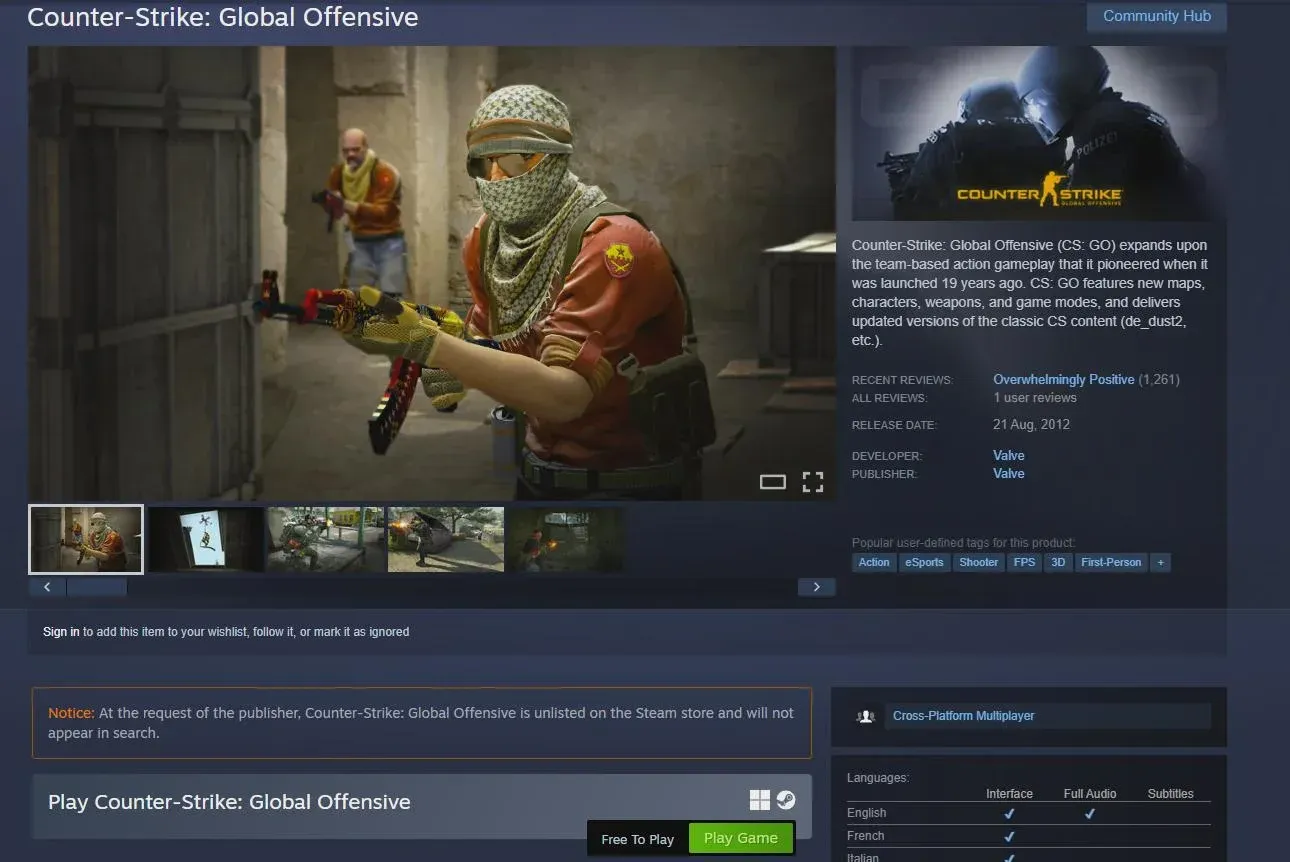
You can now download the official version of CS:GO directly from Steam. No need to go through third-party websites or the Legacy version anymore. But there's a small catch, though.
Searching for CS:GO in Steam Search won't show you anything. You can only access its page through the special link, which, of course, is attached in our article. After finding it, add it to your Library and download it.
How to Connect to CS:GO Servers?
After you download CS:GO, you won’t be able to simply click “Play”. Well, you can, but only with bots, and let's be real. Who wants to play with bots? Fortunately, you can find community servers with real players inside.
Firstly, open the game and make sure it is the right version. You will see that you can play Competitive and other modes, but only with bots. So if you want to play with players, there are several ways:
Dedicated CS:GO Websites
After the re-release of CS:GO, it didn't take long for the community to create servers tailored for CS:GO. If you search "CS:GO Servers" in Google, you'll find dozens of sites with old CS:GO servers, along with community-favorite game modes. Here are some of the best ones:
- CYBERSHOKE – You can find the classic 5v5 or 2v2 matchmaking here, along with the best modes, including Danger Zone, Prophunt, and more.
- CS:GOPremier – If you want ranked matchmaking, this is your place. After just 6 victories, you get an ELO like in Premier. The site has its own Anti-Cheat, report system, and Overwatch, which takes the number of cheaters in the game to a minimum.
Through the in-game Developer Console
If you want to connect to the desired server the old-school way, through the Developer Console, there's an easy way to do it.
To join a community server from the Developer Console:
- Enable the Developer Console in CS:GO Settings.
- Press the key ‘~’ to open the console.
- Find a Server IP Address.
- Then type connect (Server IP Address) and press “Enter”.
That’s all you need to do to join a CS:GO community server. The crucial part is finding the Server IP Address for the server you want to play on.
Through Steam Server Browser
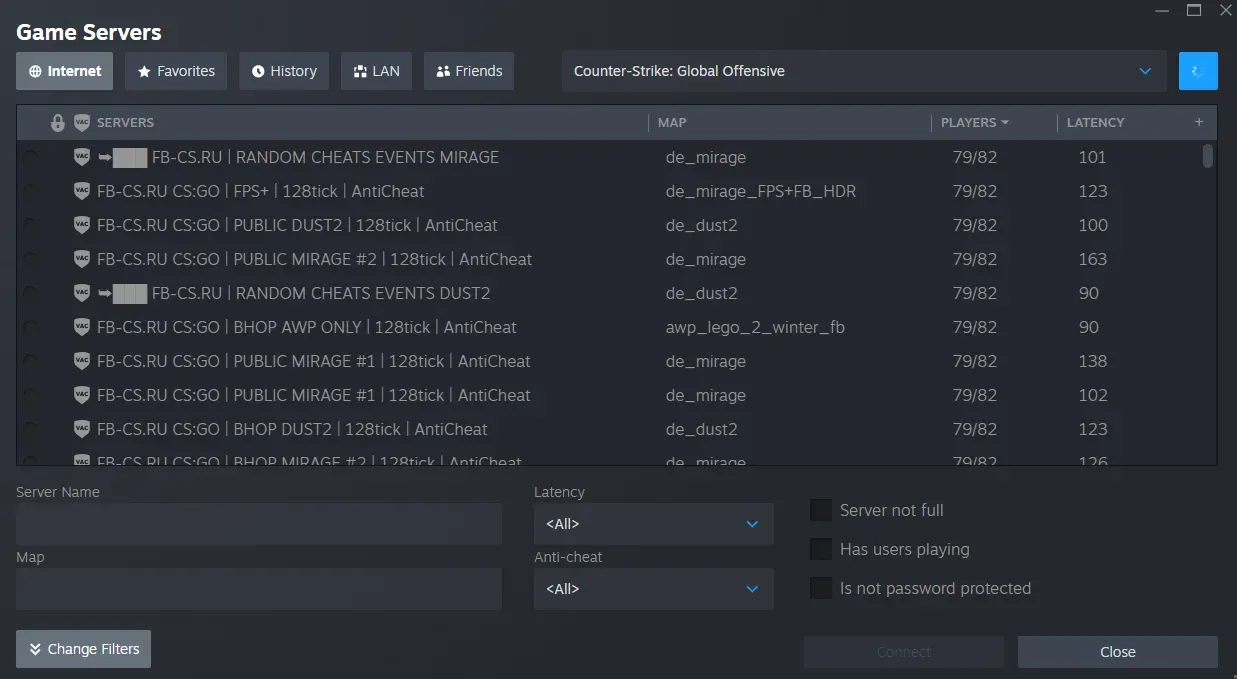
While the in-game server browser saves the servers you joined in the past, it doesn't show you all available servers. That's why you should not fully rely on it. Steam has a built-in tool that helps you connect to CS:GO servers, and it works much better:
- Go to the Steam Client and click on the “View” tab in the top-left corner.
- Then select “Game Servers”.
- Filter it for CS:GO with the toggle named “Select Game” and click the search button.
- Now you should find Counter-Strike: Global Offensive in the dropdown.
After this, you will be able to join any community server you want to by clicking on the name and tapping on “Connect”.
If you want to play without lag, simply find the server with the lowest ping.
Note: If the “Connect” bar is not working, you should right-click and select “View Server Info”, copy the IP address, and type connect (Server IP Address) in the CS:GO Developer Console.
What You Have to Know Before Installing CS:GO in 2026
First, while the core CS:GO gameplay, community servers, and voice chat still work perfectly, there are some limitations since it's now a "legacy" game.
- Your inventory items won't show up in-game, and you might get weapon loadout issues (like M4A4 instead of M4A1-S).
- No future updates will be released for the old CS:GO: No patches or new mechanics.
- The community for CS:GO is smaller compared to its old levels. Sometimes, you'll find yourself looking for players and end up opening CS2 instead.
Conclusion
If you're wondering if you can play CS:GO online after CS2, the answer is YES! It is possible to play CS:GO in 2026 with friends. Not long after it became separate from CS2, the internet became flooded with community servers with different game modes.
However, while it looks great on the surface, there are some limitations, including inventory issues, a smaller player base, and the fact that it will never receive new updates.
FAQS
Can I get a VAC ban in CS:GO in 2026?
Yes, even though Valve has not activated Competitive matchmaking, the Anti-Cheat (VAC) is still active on community servers. Use of any cheats can lead to a ban that may affect your Steam profile and CS2 access.
Can I play Faceit on the CS:GO version?
Now, at release, you can’t actually play Faceit. However, you can play in a CS:GO Premier community server.
Why does the game crash when I join a server?
Try checking steam.inf file in the game folders. Periodically, the ClientVersion needs to be updated to match the community server requirements.
Are community servers safe to use?
Most community servers are safe and well-managed, but different servers have different risk levels.