S1mple's CS2 Settings
Many players often tweak their settings in search of better gameplay, but not every change leads to improvement, as sometimes, the wrong settings can negatively impact the entire experience.
That's why knowing how to set things up right matters. Many gamers try to copy what the pros use in CS2, but even the best settings might not work for you without making the right changes.
Using pro settings is smart, but getting real improvements depends on how well you adjust all those settings to work with your style and setup.
Who is s1mple?
Oleksandr "s1mple" Kostyliev is regarded as one of the greatest Counter-Strike players ever. Hailing from Ukraine, s1mple began his professional journey in 2014 (CS:GO days) and quickly rose to prominence due to his incredible aim and unmatched skill.
Over the years, he has played for several top-tier teams, most notably Natus Vincere (Na'Vi), where he helped the team secure essential tournaments, including one major: the PGL Major Stockholm 2021.
His settings, crosshair, and in-game preferences are often studied and copied by aspiring players who hope to understand what makes him so effective.
s1mple’s Hardware and Equipment

- Keyboard - Logitech G715 TKL
- Headset - Logitech G Pro X 2
- Mousepad - SteelSeries QcK
- Mouse - Logitech G Pro X Superlight 2
s1mple uses a high-end gaming setup equipped with top-tier peripherals and powerful hardware, built for peak competitive performance.

- GPU - NVIDIA GeForce RTX 4090
- Monitor - ZOWIE XL2566X+
- Earphones - Sennheiser's CX 300S
- CPU - AMD Ryzen 7 7800X3D
In Game Settings
Want to play like s1mple? Well, here's his full CS2 setup straight from his stream.
Mouse
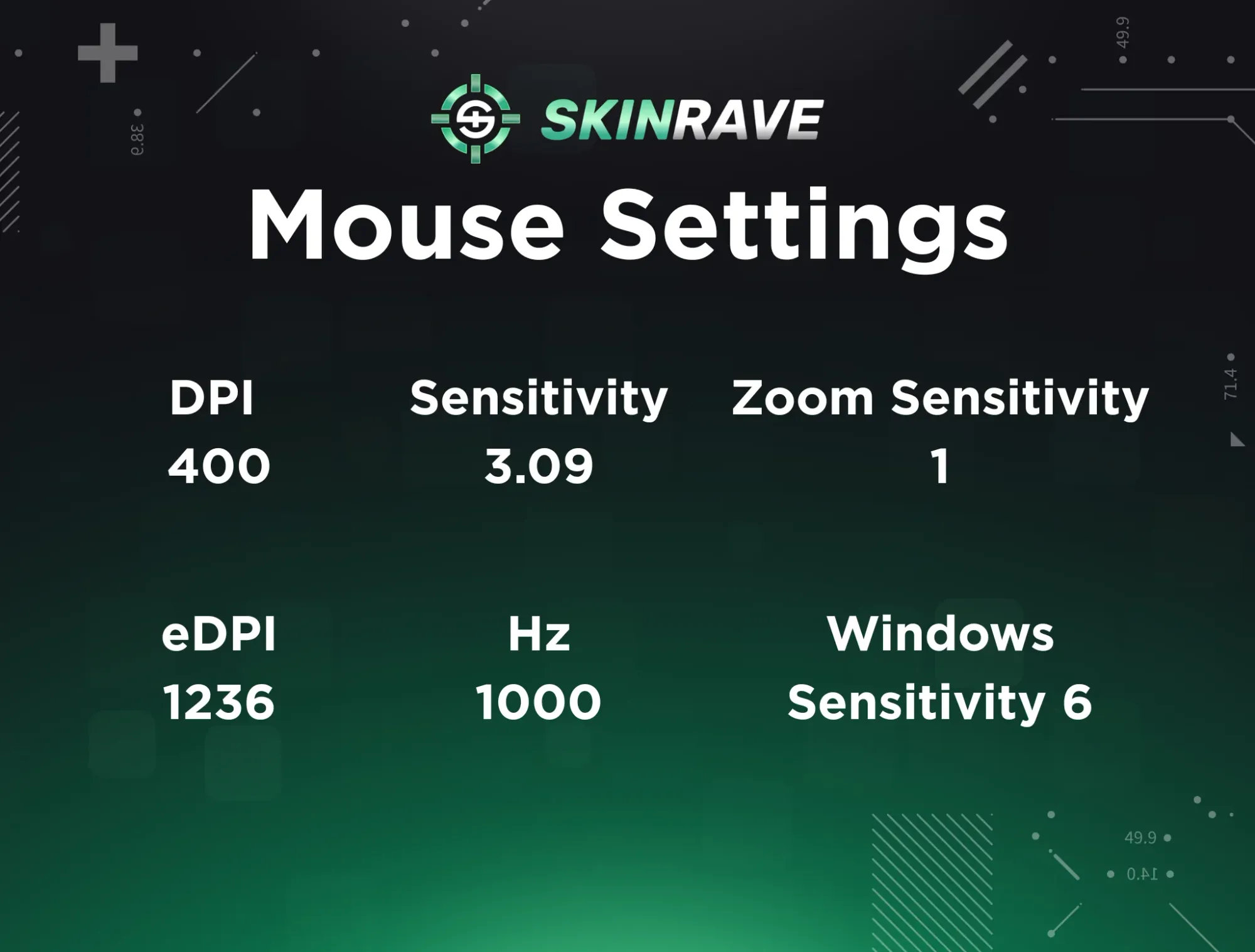
If you want to improve your aim, setting up your mouse correctly is the first step you have to take:
- DPI 400
- eDPI 1236
- Sensitivity 3.09
- Hz 1000
- Zoom Sensitivity 1
- Windows Sensitivity 6
Additional Commands
- bind "MWHEELUP" "invprev"
- bind "MWHEELDOWN" "+jump"
Launch Options
-freq 360 -novid -console +fps_max 999
Crosshair
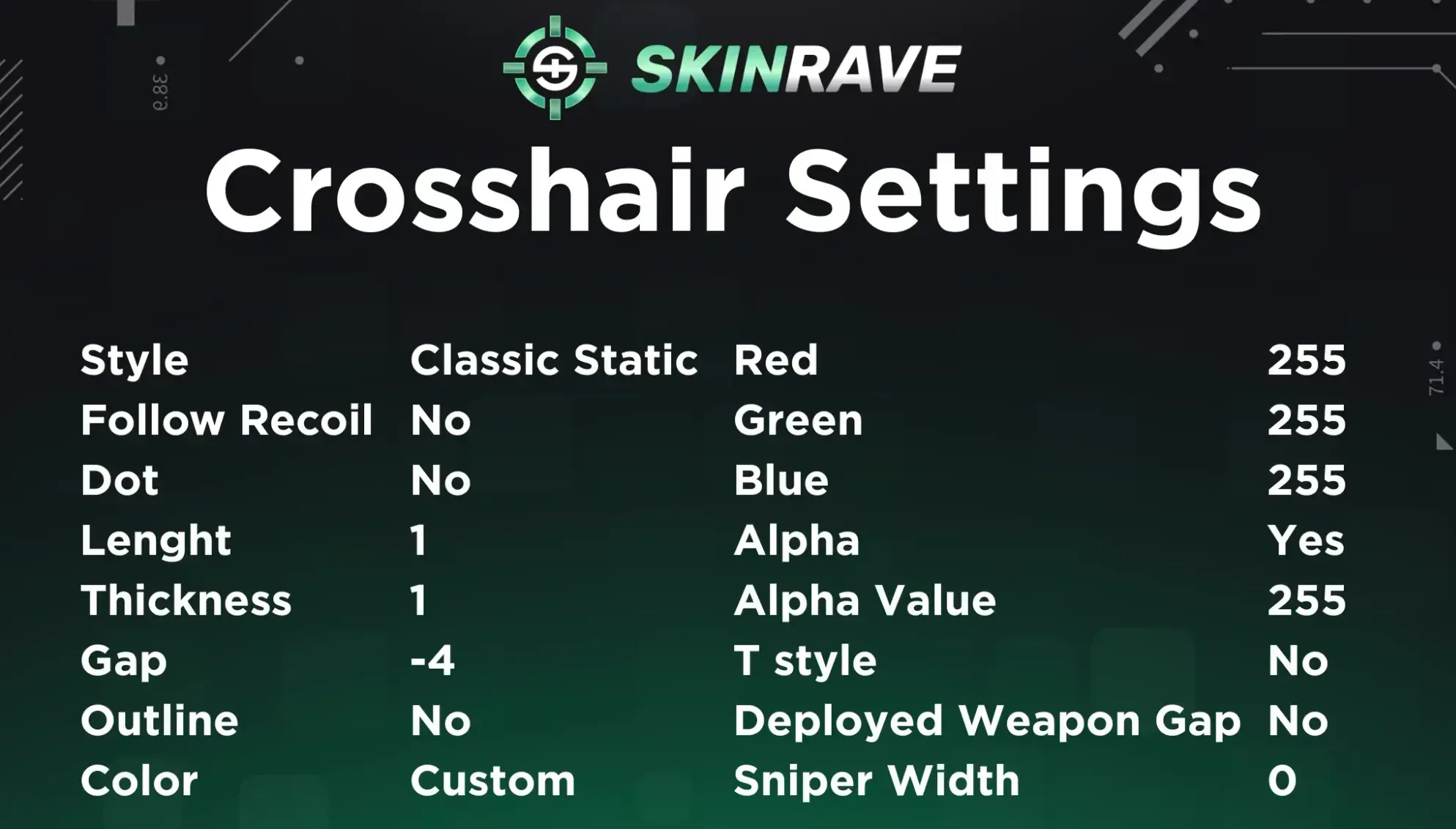
Crosshair Code - CSGO-jkmFu-YrpWJ-JqL2H-9DSTS-o4xLA
Crosshair is one of the most essential elements of playing at the top level. Even with perfect mouse settings, without the right crosshair, your aim can suffer because you need clear visual feedback to hit your shots consistently.
Viewmodel
Similar to Donk, s1mple uses regular Viewmodel Settings:
- FOV: 68 – provides a balanced field of view
- Offset X: 2.5 – positions the weapon slightly right
- Offset Y: 0 – keeps the weapon centered vertically
- Offset Z: -1.5 – lowers the weapon for better visibility
- Presetpos: 2 – uses the custom view model position
Video Settings
s1mple uses a 1280x960 stretched resolution with a 4:3 aspect ratio for larger player models, paired with 110% brightness and fullscreen mode for optimal visibility and focus.
Advanced Video

Radar

His radar settings are optimized for awareness, with player-centered, rotating radar, shape toggle enabled, and a 0.45 zoom for a wider map view.
- Radar Centers The Player Yes
- Radar is Rotating Yes
- Toggle Shape With Scoreboard Yes
- Radar Hud Size 0.83
- Radar Map Zoom 0.45
s1mple's Loadout
His most commonly used skins include the AK-47 | Leet Museo, AWP | Fade, Butterfly Knife | Gamma Doppler, and Sport Gloves | Hedge Maze, among many others. He's built up quite a massive inventory over the years.