
How to Use CS2 Replay & CS2 Demo Controls: A Complete Guide
One of the best ways to improve your gameplay in CS2 is by rewatching your own games. In fact, research on player-driven video analysis shows that reviewing recorded gameplay can improve self-reflection, help identify mistakes, and accelerate skill development.
CS2 makes this process very easy with its built-in demo viewer. So whether you're reviewing a bad play, studying an opponent's strategy, or looking for clips to add to a highlight reel, the replay tools give you everything you need to examine a match from different angles.
So in this guide, we'll explain exactly how to use all the CS2 demo controls and walk you through everything you need to know about them.
What Are CS2 Demo Controls?
CS2 demo controls, also known as CS2 replay controls, are the tools used to navigate and control recorded Counter-Strike matches. They allow you to review, pause and resume a demo, move through the timeline, skip between rounds, change playback speed, switch player perspectives, and use different camera modes.
How to Open CS2 Demo Controls
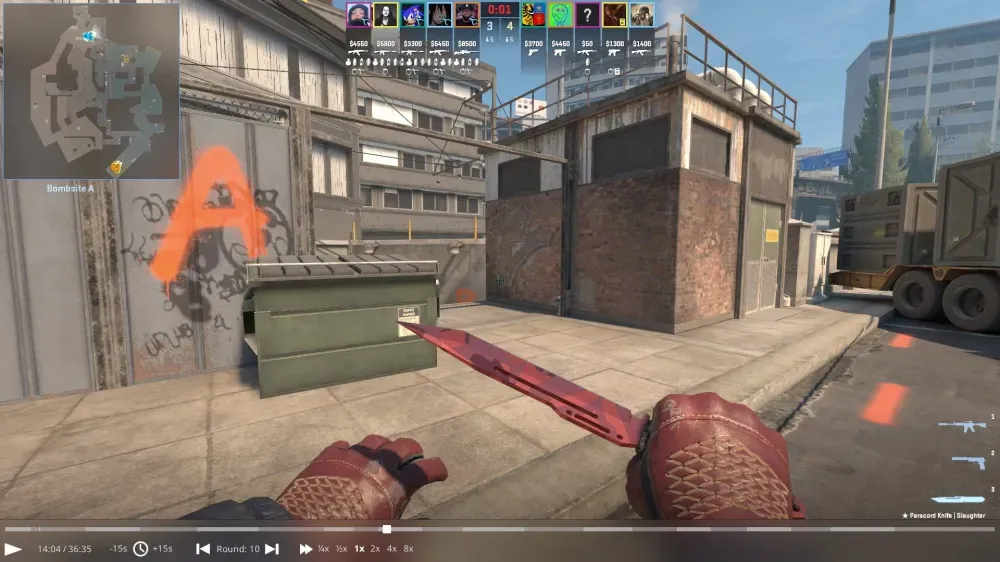
When you start watching a demo, the replay control interface should appear automatically at the bottom of the screen. If it doesn't appear, you can open it manually by pressing:
- Shift + F2
You can also open the console and type:
- demoui
This will display the full replay control panel.
Basic CS2 Demo Controls
Once the interface is open, you'll see several tools that help you navigate through the demo:
Play and Pause
The play button starts the replay, while pause freezes the moment on screen. This is useful when you want to carefully study a fight or positioning mistake.

You can also use:
Spacebar – pause or resume the demo.
Timeline Navigation
At the bottom of this interface, you will also see a timeline bar. This allows you to view the entire match from start to finish.
You can:
- Click anywhere on this timeline bar to go directly to that point
- See markers that indicate when kills or other important events happened
- Skip directly to rounds that interest you

Also, rounds come in opposite shades of gray to highlight the beginning and end of each round. This is very useful when you are trying to search for something specific.
Skip Time
Replay controls also allow you to jump forward or backward in the demo.

These buttons typically skip around 15 seconds, which helps you move through the match quickly without manually dragging the timeline.
Jump Between Rounds
Another useful feature lets you move directly to the next or previous round.
This is perfect for reviewing key rounds like:
- pistol rounds
- clutch situations
- eco round wins
- important retakes

Instead of watching the entire match, you can quickly jump to the rounds you want to analyze.
Adjusting Replay Speed
One of the most useful features of demo playback is speed control.
You can slow down or speed up the replay depending on what you're trying to do.
Common speed options include:
- 0.25x – very slow motion
- 0.5x – slow motion
- 1x – normal speed
- 2x or 4x – fast review

Slow motion is great for analyzing aim, movement, or grenade usage, while faster speeds help you quickly scan through the match.
Spectating Different Players
When watching a demo, you are not limited to one perspective. You can switch between players to see what everyone was doing during the round.
Common controls include:
- Number keys (1–0) – switch to specific players
- Left click – cycle through players
- Spacebar – change viewing perspectives
This is extremely helpful when analyzing team strategies or learning how opponents approached certain situations.
CS2 Free Cam on Practice Matches
Figuring out how to free cam cs2 demo is important because lets you move around the map freely without being locked to any specific player.
You can activate it with:
Q – Free camera
Once activated, you can move the camera using WASD and your mouse.
This mode is very useful when you want to:
- observe team rotations
- analyze site executes
- study positioning across the map
It gives you a much better understanding of how rounds unfold from a tactical perspective.
Using X-Ray Vision
Another powerful replay feature is X-ray mode.
This option allows you to see player outlines through walls. It helps you understand enemy positioning and how close fights actually were.
X-ray is commonly used when analyzing strategies or watching professional matches.
Useful Console Commands
While most controls are available through the replay interface, some commands can make navigation easier.
Here are a few helpful ones:
- playdemo filename - Loads a demo file.
- demo_timescale 0.5 - Plays the replay at half speed.
- demo_gototick # - Jumps to a specific moment in the demo.
- demo_pause - Pauses the replay.
These commands are especially useful for advanced analysis or content creation.
Replays for Content Creators
Replay controls are also extremely valuable for streamers and content creators.
Using demos allows you to:
- capture clean highlight clips
- record cinematic camera angles
- replay big moments from different perspectives
Many creators combine free camera mode with slow motion to produce high-quality gameplay clips.
Final Thoughts
CS2 demo controls are an incredibly useful tool for anyone who wants to improve their gameplay or create better content. With features like timeline navigation, adjustable playback speed, free camera mode, and player switching, reviewing matches has never been easier.
Instead of jumping straight into another game after a loss, take a few minutes to watch your demo. You might discover positioning mistakes, missed opportunities, or tactical patterns you never noticed during the match.
Over time, using replay analysis consistently can make a huge difference in your decision-making and overall performance.