CS2 Movement Tricks That Will Level Up Your Gameplay
Playing CS2 is not always about having a good reaction or a good aim. Sometimes, becoming a better player involves working on other skills as well. A major aspect of the game that you should pay attention to is your movement. By movement, we don't mean the simple mechanics like running, shifting, or crouching.
CS2 movements are more complicated than that. Movements include techniques such as Strafing, Counter-Strafing, Bhopping, and much more.
Thinking that movements are not essential is wrong. Each technique offers a way to play smarter and feel the game on a different level. If you've been asking the question "How to improve movement in CS2?", you're in the right place. Let us break down each technique one by one.
Strafing
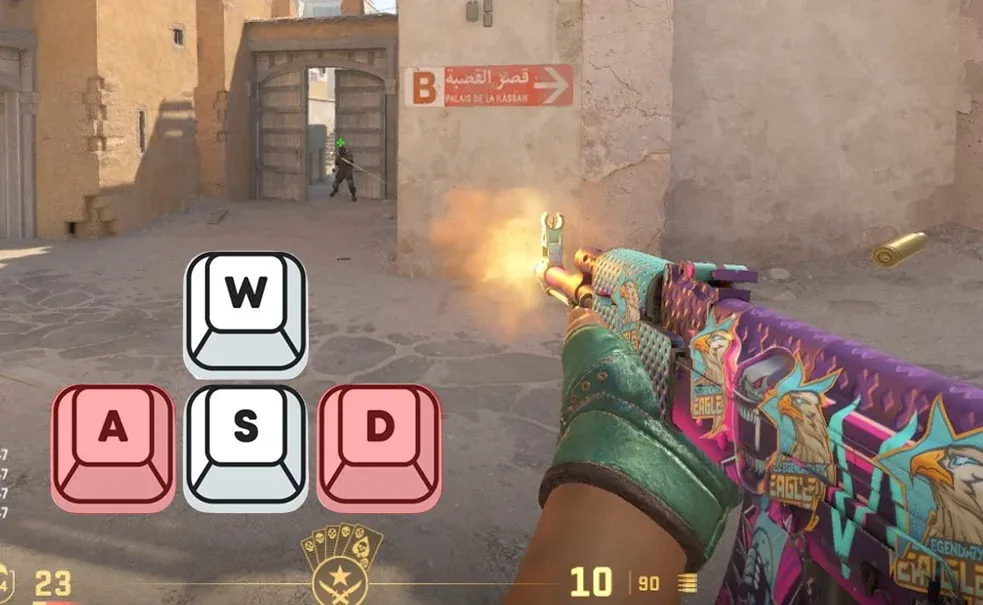
Strafing is one of the fundamental movements that you must learn in CS2.
In simple words, strafing means maneuvering with "A" and "D" movements while aiming at the same spot. Strafing helps avoid enemy shots in many situations, while being ready to counter-attack. Also, it's one of the important steps in peeking, which we'll cover later.
After learning basic strafing, the next step is Counter-Strafing.
Counter-Strafing
To master Counter-Strafing, you need to understand how your movement and speed work.
When you press "W", your character does not momentarily reach its maximum speed. Nor does it instantly lose it when you unhold the button. Your character takes a few steps before stopping. This directly affects your shooting accuracy.
That is why players came up with Counter-Strafing — a technique where you need to push the button in the opposite direction of your movement to stop momentarily. It gives you maximum accuracy after movement and the best chances of defeating the enemy.
Combine it with strafing and upgrade your gameplay to a higher level.
Air strafing
While strafing means moving in different directions to avoid being shot, air strafing is a bit different.
By default, your character runs at a maximum speed of 250 units per second. But this technique offers a slight increase in speed while in the air.
Air Strafing includes jumping and quickly hitting "A" and "D" and moving your mouse in the same direction. It increases your velocity, giving you a boost. Be careful not to overdo it, or you’ll lose momentum and kill the strafe.
It’s also an important part of mastering the Long Jump.
Long Jump
When the distance is too wide for your character to jump across normally, you use a Long Jump.
Start Air Strafing as soon as you jump to get additional momentum – enough to get you across. You can also combine it with a small Bhop before the last jump to increase your speed even more.
One important detail of the Long Jump is not holding "W" after the jump, because it affects the strafe.
We mentioned Bhopping, said that it involves Air Strafing, but never explained it. Let’s get to it right now.
Bhopping
Bunny Hopping (Bhopping) combines air strafing and constant jumping. It accumulates your character speed, helps you hit tricky jumps, and dodge bullets with ease.
The basic steps are:
- Run a few meters to build up speed, then begin jumping.
- Don't stop jumping (explained later)
- Air strafe to gain momentum.
- Alternate between the keys and keep repeating the motion.
There's a small catch that can make Bhop incredibly hard in competitive modes. When you use the Space Button to jump, you have exactly one chance to hit it at the right moment. It often results in lost momentum and awkward movements.
To avoid it, skilled players bind the mouse wheel to perform a jump whenever scrolled up or down. Here are the CS2 movement binds that you need:
- bind "mwheeldown" "+jump"
- bind "mwheelup" "+jump"
One scroll of the mouse wheel is similar to pushing the Space Button multiple times, which guarantees that you'll perform the jump at the perfect moment.
To learn more about bunny hopping, make sure to check out our guide to Bhopping to master it easier.
Peeking
Peeking is a technique that helps you gather information, bait shots, and enter a combat on your terms. It also includes the basic strafing, so make sure to master it.
Peeking means exposing your character for a split second and getting back to cover. While you may think it's relatively easy, there are multiple techniques, such as Normal and Wide Peeks, that help you correctly engage in a fight.
Check out our guide to peeking to see all the different peeks and learn how to perform them.
Crouch Jump
Sometimes a spot is too high, and your character falls short. That’s when the Crouch Jump helps.
Hitting the Crouch Button after you jump gives your character a small boost – just enough to climb these high grounds.
Don't forget to press "W" while you're doing it for your character not to fall back.
How to Practice Movement?
Each skill that we mentioned has its CS2 movement map. An environment to practice your movement. For basic skills, such as Strafing and Counter-Strafing, you can use aim maps, then perfect them against real enemies in competitive play.
For practicing Bhopping and Air Strafing, the best options are Surf and Bhop community maps and servers. Surf maps consist of long, inclined platforms that allow you to glide when you press on their surface. Hold the key opposite to the side you’re on, like left if you’re on the right, and right if you’re on the left. While you try to pass different levels, you have to Air Strafe during the game to accumulate speed.
Some Bhop maps are adjusted for active pool maps, where you can learn all the difficult jumps that you can use in your daily gaming.
To combine all these skills in one environment, you can try KZ Maps, where you need to pass difficulties. If you visit cs2kz.com, you’ll find a collection of the best CS2 movement maps and servers for them. With time and practice, you'll move like a pro in no time.
CS2 Movement Cheats (Legal)
Some helpful CS2 commands will help master movements in the beginning. Some of them are for convenience, while others you cannot ignore.
- sv_cheats 1 – Allows using in-game cheat commands.
- r_drawviewmodel 0 – Hides your weapon.
- cl_draw_only_deathnotices 1 – Removes the HUD and the Kill Counter (CS2 viewmodel off).
- cl_drawhud 0 – Removes the HUD, the Kill Counter, and the Crosshair.
Removing the HUD can help you better concentrate on your character and get the feel of its movement. It’s completely optional to do it, but highly recommended at the beginning of your journey.
In the case of Bhop, these commands are necessary to help your character auto-jump and gain speed.
- sv_enablebunnyhopping 1 - Enables the mechanics of bhop.
- sv_autobunnyhopping 1 - Enables automatic jumping when holding the jump button (auto bhop).
- sv_maxvelocity 3500 - Increases maximum speed; You gradually gain speed while bhopping.
Also, you can use “cl_showpos 1”, which creates a small display that tracks your velocity.
If you follow this CS2 movement guide and dedicate 10-15 minutes to practicing these skills, you will feel the results in your daily matches almost instantly. Not only will you become more confident and start moving like a pro, but you will also become a better teammate.